我在用的工具 / TOOL01
Buzz:离线语音转文字,用一段模拟问诊录音实测
Buzz 是一款免费、开源的桌面软件,用 OpenAI 的 Whisper 模型把语音转成文字,全程在自己的电脑上完成。我在健康 AI 课程的作业里用了它:先把一段模拟问诊录音转写成文字稿,再让大语言模型(LLM)把文字稿整理成病历摘要。这一页记录怎么安装和使用它、小模型和大模型到底听到了什么,以及换成真实临床录音时我会怎么做。
Buzz: Offline Speech-to-Text, Tested on a Simulated Patient Interview
Buzz is a free, open-source desktop app that turns speech into text with OpenAI's Whisper models, entirely on your own computer. I used it for an assignment in my health AI course: transcribe a simulated patient interview, then have an LLM turn the transcript into a patient note. This page covers how to install and use it, what the small and large models actually heard, and what I would do differently with real clinical audio.
- 章节 / section
- 关键概念 / key term
- 阅读提示 / reading note
Buzz 是什么
Buzz 是 Whisper(OpenAI 开源的语音识别模型)的桌面界面。选一个文件、选模型大小,Buzz 就在本地完成转写:不用注册账号,也不用上传。
| Buzz | |
|---|---|
| 费用与许可 | 免费,开源(MIT 许可) |
| 支持系统 | Windows、macOS(Apple 芯片)、Linux |
| 音频去哪了 | 哪儿也不去:转写在你自己的电脑上进行 |
| 输入 | 音频或视频文件、YouTube 链接、麦克风实时录音 |
| 输出 | TXT、SRT 和 VTT 字幕,以及带说话人标签的 Word 文件 |
What Buzz is
Buzz is a desktop front end for Whisper, OpenAI's open speech-recognition model. You pick a file, choose a model size, and Buzz transcribes it locally: no account, no upload.
| Buzz | |
|---|---|
| Cost and licence | Free, open source (MIT licence) |
| Runs on | Windows, macOS (Apple silicon), Linux |
| Where the audio goes | Nowhere: transcription runs on your own computer |
| Input | Audio or video files, YouTube links, live microphone |
| Output | TXT, SRT and VTT subtitles, and a Word file with speaker labels |
怎么安装
所有下载都在 Buzz 的 GitHub 页面 的 Installation 部分:
- Windows:从 SourceForge 下载安装包。软件没有数字签名,Windows 会弹出警告,点 More info → Run anyway 即可。
- macOS:下载
.dmg。新版本需要 Apple 芯片,支持 Intel Mac 的最后一个版本是 1.4.5。 - Linux:Flatpak、Snap 或 AppImage。
第一次使用某个模型时,Buzz 会先下载它;模型越大,下载越大。
Installing it
Everything is linked from the Buzz page on GitHub, under Installation:
- Windows: download the installer from SourceForge. The app is not signed, so Windows shows a warning; choose More info → Run anyway.
- macOS: download the
.dmg. Current versions need Apple silicon; 1.4.5 is the last one for Intel Macs. - Linux: Flatpak, Snap or AppImage.
The first time you use a model, Buzz downloads it. The larger the model, the bigger the download.
我是怎么用它的
作业给了一段 3 分半的模拟问诊录音:一位医生,和一位长途飞行后开始气短的病人。我的流程分两步:
- 用 Buzz 把录音转成文字稿。我跑了两次,分别用最小的 Tiny 和 Large-v3-Turbo,好做比较。
- 让 LLM 把文字稿整理成结构化的病历摘要。
这段问诊是模拟的,所以这里不涉及隐私问题。但如果是真实病人的录音,离线工具就很重要:音频不会离开你的电脑。当然,仍然要遵守所在机构关于病人数据的规定。
How I used it
The assignment gave us a 3.5-minute recording of a simulated patient interview: a doctor and a patient who has become short of breath after a long flight. My workflow had two steps:
- Buzz turned the recording into a transcript. I ran it twice, with the smallest model (Tiny) and with Large-v3-Turbo, to compare them.
- An LLM turned the transcript into a structured patient note.
Because the interview was simulated, privacy was not an issue here. With real patient recordings, an offline tool matters: the audio never leaves your computer. You would still need to follow your organization's rules for patient data.
上手:从文件到文字稿
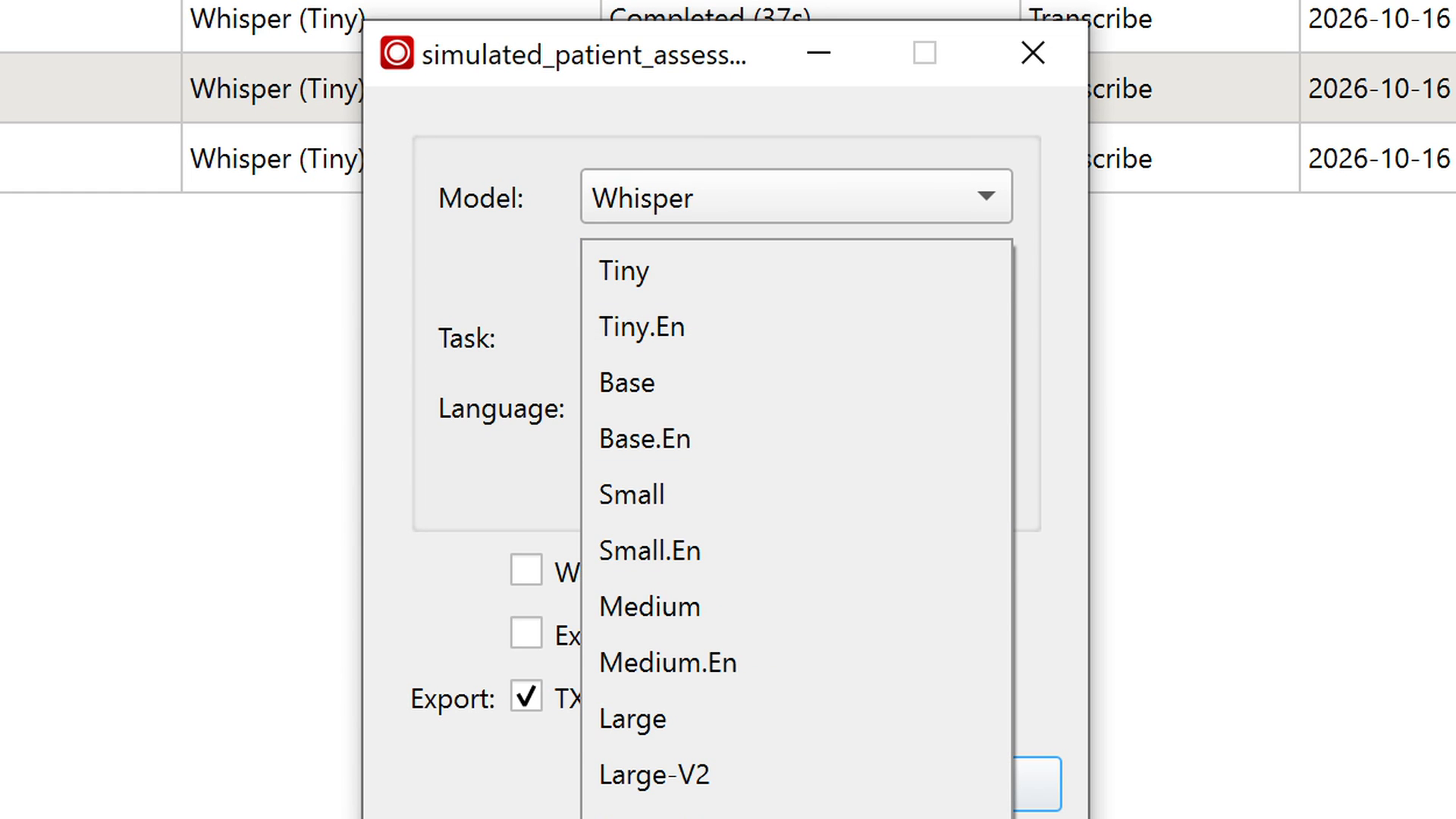
选 File → Import File,挑好录音,选一个 Whisper 模型,点 Run。Tiny 最小、最快;Large-v3-Turbo 大得多,也准得多。在我的笔记本电脑上,这段 3 分半的录音用 Tiny 大约 20 到 40 秒,用 Large-v3-Turbo 大约 1 分钟。
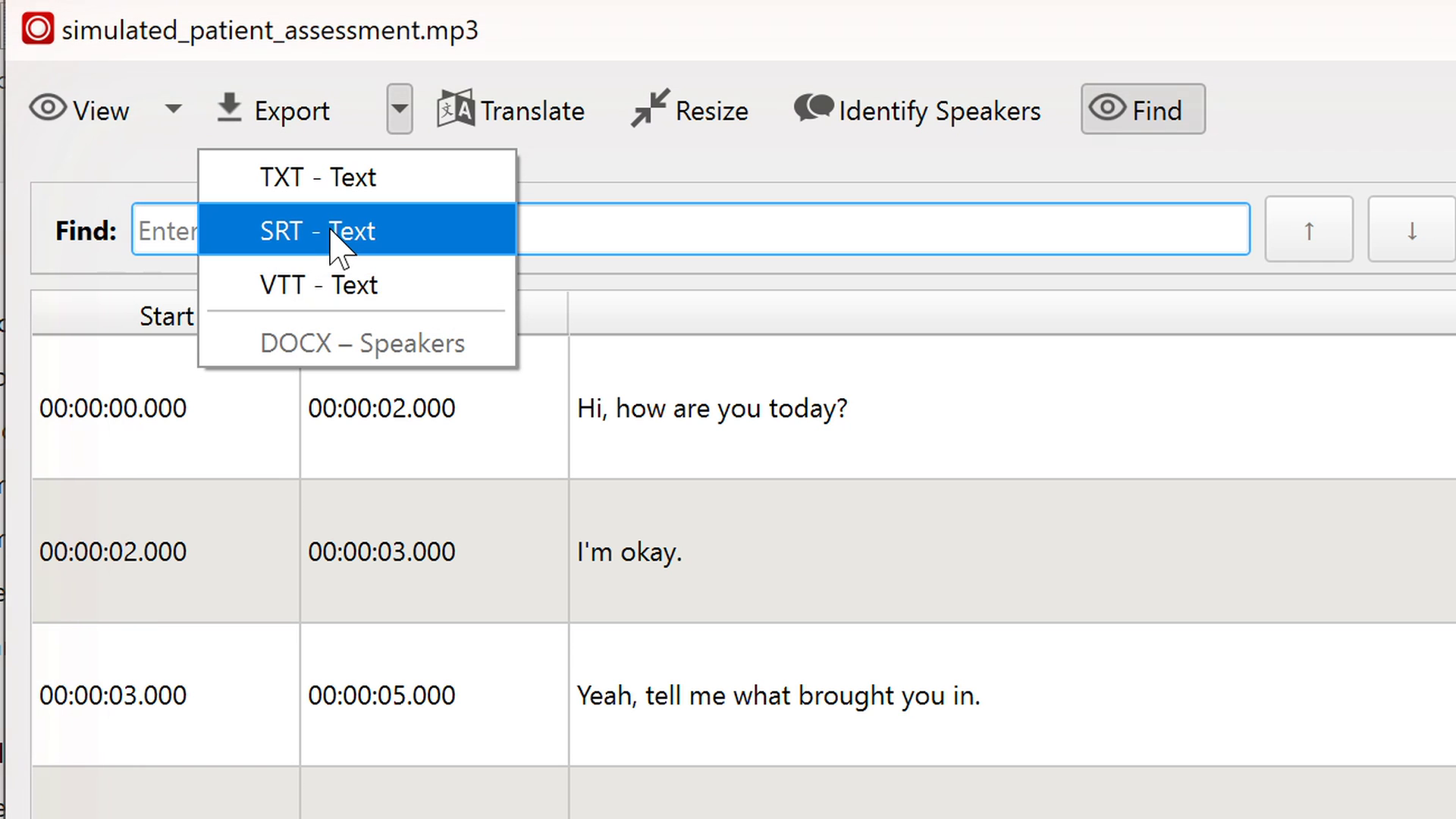
双击完成的任务,就会打开文字稿查看器。最有用的功能都在它的工具栏里:
| 按钮 | 作用 |
|---|---|
| View | 在纯文本、带时间戳的表格和按说话人分段的视图之间切换 |
| Export | 导出为 TXT、SRT 或 VTT 字幕,或带说话人标签的 Word 文件 |
| Translate | 用 LLM 翻译文字稿;需要在 Preferences 里填 OpenAI API key |
| Resize | 调整字幕的每行长度;合并行的功能只有在转写时打开了逐词时间戳才能用 |
| Identify Speakers | 区分不同的声音(我的电脑上大约一分半),然后可以给说话人命名,比如 Doctor 和 Patient |
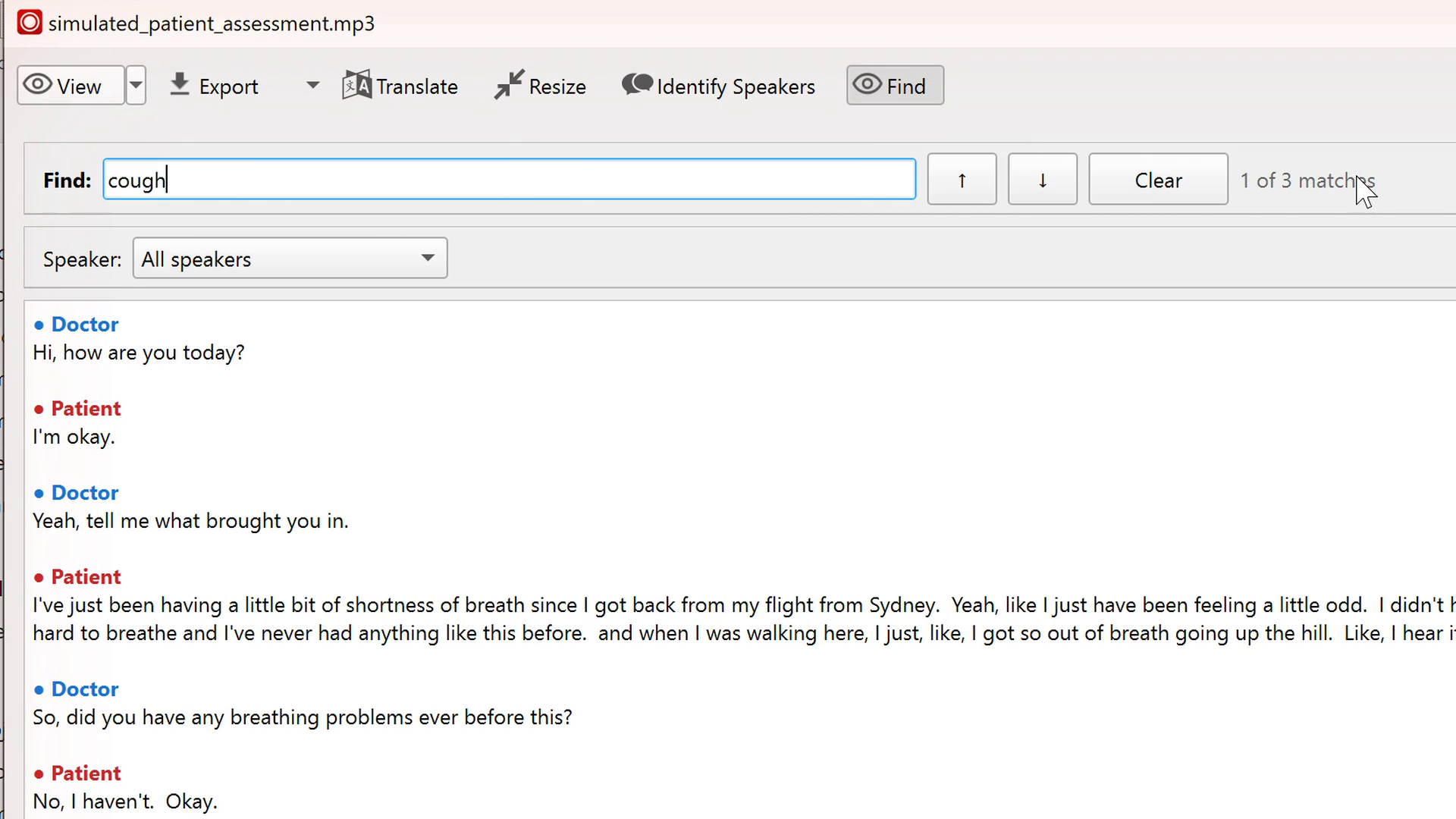
| Find | 在文字稿里跳到某个词的每一处 |
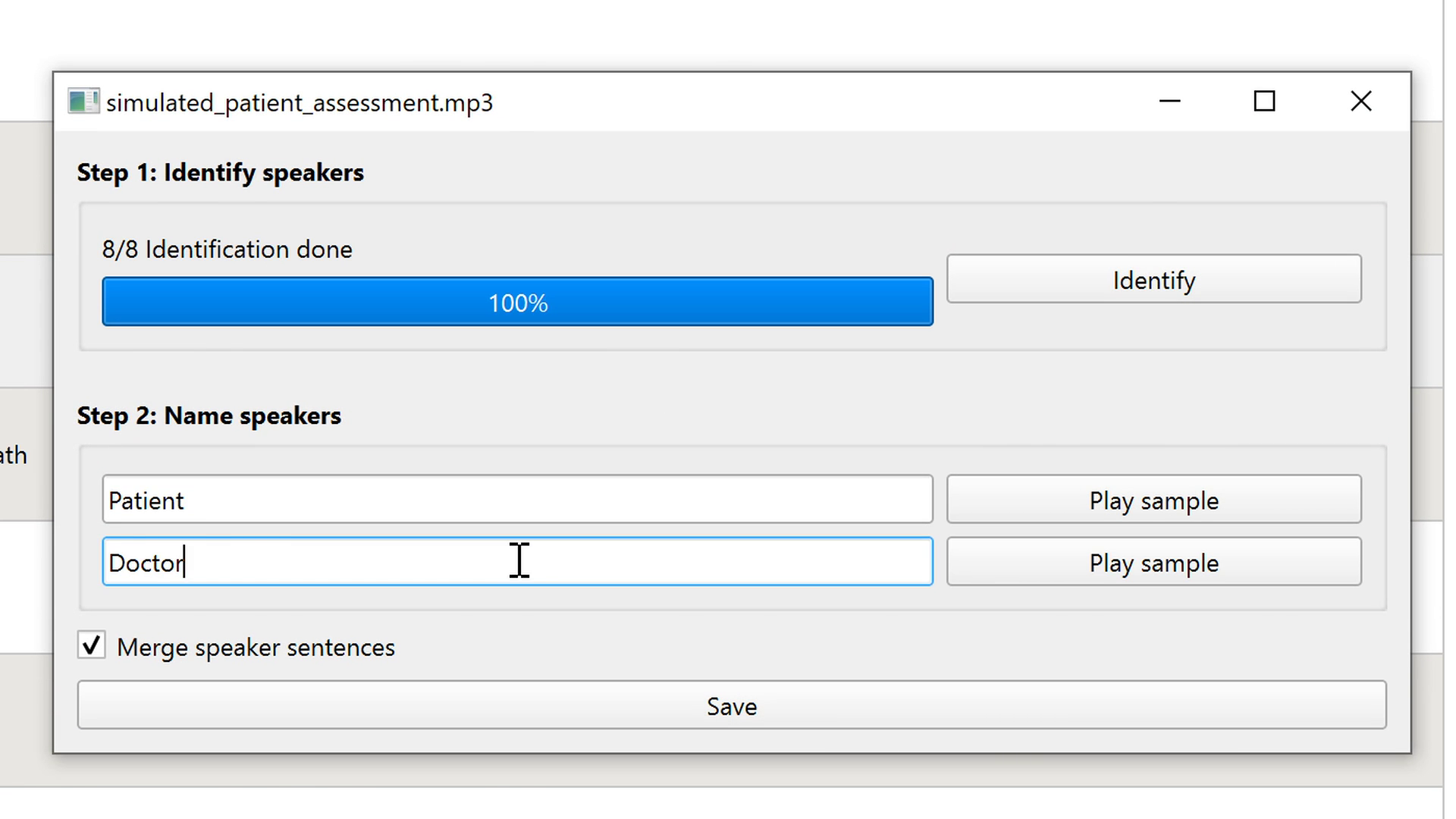
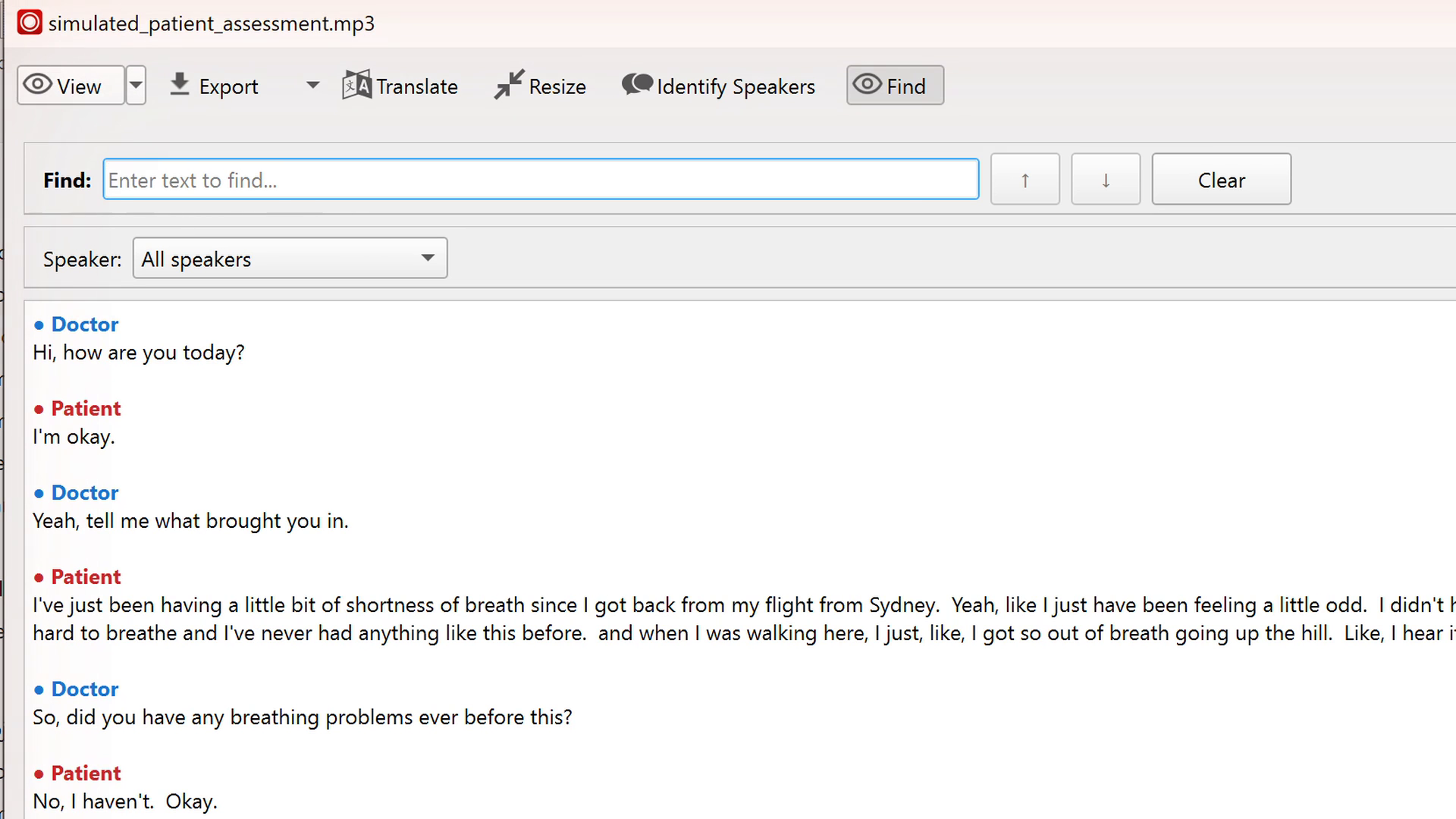
说话人编号不是固定的。我有一次 Speaker 0 是病人,另一次是医生。命名之前先看几句(或者点 Play sample 听一下)。
Using it: from file to transcript
Choose File → Import File, pick the recording, choose a Whisper model and press Run. Tiny is the smallest and fastest; Large-v3-Turbo is much bigger and more accurate. On my laptop, the 3.5-minute interview took about 20 to 40 seconds with Tiny and about a minute with Large-v3-Turbo.
Double-click a finished task to open the transcript viewer. Its toolbar is where most of the useful features live:
| Button | What it does |
|---|---|
| View | Switch between plain text, a timestamped table, and a view by speaker |
| Export | Save as TXT, SRT or VTT subtitles, or a Word file with speaker labels |
| Translate | Translate the transcript with an LLM; needs an OpenAI API key in Preferences |
| Resize | Adjust line length for subtitles; merging lines works only if word-level timings were on during transcription |
| Identify Speakers | Separates the voices (about a minute and a half on my laptop), then lets you name them, such as Doctor and Patient |
| Find | Jumps to every match of a word in the transcript |
Speaker numbers are not fixed. In one of my runs Speaker 0 was the patient, in another the doctor, so check a few lines (or press Play sample) before naming them.
同一段录音,两个模型
两个模型的差别很明显,下面两个片段最能说明问题。先听原声,再对比文字稿。
| 模型 | 文字稿 |
|---|---|
| Large-v3-Turbo ✓ | How long have you been on it? Demuline. Sorry. That's what it is. |
| Tiny ✗ | Though, how long have you been on a Demi-Lensary? |
我另外查了这个药名,Demuline 是对的。药名是不常见、又容易和别的词听混的词,对任何语音模型都是难点。
| 模型 | 文字稿 |
|---|---|
| Large-v3-Turbo ✓ | So there's no cough or phlegm or anything like that? |
| Tiny ✗ | So there's no cough. No. I'm already. No. |
Tiny 把 “phlegm”(痰)整个漏掉了,用 Buzz 的 Find 也能确认:在 Tiny 的文字稿里搜 phlegm,一处都找不到。Tiny 还把一些问句写成了陈述句,比如 Large-v3-Turbo 写的是 “Your periods are okay?”,Tiny 写成了 “Periods are okay.”。Large-v3-Turbo 甚至听出了几个我自己都没听清的词。
Same recording, two models
The difference between the two models was clear. Two moments show it best. Listen first, then compare the transcripts.
| Model | Transcript |
|---|---|
| Large-v3-Turbo ✓ | How long have you been on it? Demuline. Sorry. That's what it is. |
| Tiny ✗ | Though, how long have you been on a Demi-Lensary? |
When I checked the medication name separately, Demuline was correct. Medication names are rare words that sound like other words, which makes them hard for any speech model.
| Model | Transcript |
|---|---|
| Large-v3-Turbo ✓ | So there's no cough or phlegm or anything like that? |
| Tiny ✗ | So there's no cough. No. I'm already. No. |
Tiny dropped "phlegm" completely, and Buzz's Find confirms it: searching the Tiny transcript for phlegm returns no matches. Tiny also turned some questions into statements, for example "Periods are okay." where Large-v3-Turbo wrote "Your periods are okay?". Large-v3-Turbo even caught a few words I could not hear clearly myself.
Large-v3-Turbo 也出了错
- 结尾的重复循环。录音最后几秒,它连续写了大约二十个 “Okay.”。Whisper 在安静或重复的音频上会出现这种重复,这次 Tiny 没有。
- 说话人标签。医生问的 “Are you on any medicines?” 被并进了病人的那段话,标成了病人说的。
这两种错误在快速浏览文字稿时都很容易漏看,而且会原样带进后续基于文字稿的任何结果里。
Where Large-v3-Turbo still slipped
- A repetition loop at the end. In the last seconds of the recording it wrote "Okay." about twenty times in a row. Whisper is known to repeat itself like this on quiet or repetitive audio; Tiny did not do it here.
- Speaker labels. One of the doctor's questions, "Are you on any medicines?", was merged into the patient's turn and labelled as the patient.
Both errors are easy to miss when you only skim a transcript, and both would carry into anything built on it.
从文字稿到病历摘要
LLM 写出的摘要条理清楚,抓住了关键临床信息:今天开始的气短、刚从悉尼长途飞回来、在服口服避孕药、深呼吸时右侧尖锐疼痛,以及没有发烧、咳嗽或咳痰。
但摘要只能用文字稿里有的信息。基于 Tiny 文字稿的摘要里,完全没有提到病人否认咳痰:这个词根本不在文字稿里。
我给 LLM 定了一条规则:不确定的地方要标出来。它照做了,而且标记正好落在风险所在的位置:
Medications: oral contraceptive pill, reported in the transcript as "Demuline" … [CHECK: The medication name may be transcribed incorrectly and should be verified against the medication list or original audio.]
From transcript to patient note
The LLM's note was well organized and caught the key clinical details: shortness of breath that started today, a recent long-haul flight from Sydney, oral contraceptive use, sharp right-sided pain on a deep breath, and no fever, cough or phlegm.
But the note can only use what the transcript gives it. From the Tiny transcript, the note never mentioned that the patient denied phlegm: the word was simply not there.
I gave the LLM a rule: flag anything it is not sure about. It did, and the flag landed exactly where the risk was:
Medications: oral contraceptive pill, reported in the transcript as "Demuline" … [CHECK: The medication name may be transcribed incorrectly and should be verified against the medication list or original audio.]
我的思考
- Buzz 免费、上手容易,而且离线运行,处理敏感录音时是一个合理的首选。
- 模型大小很关键。涉及临床的内容我会用大模型;Tiny 的错误恰好落在最关键的词上。
- 它不只是转写:还能区分说话人、搜索,并导出做笔记或字幕需要的各种格式。
- 如果接下来要让 LLM 处理文字稿,给它定规则。让它标出不确定的内容,我的核对快了很多:我知道该看哪里。
- 最后仍然要由人来核对药名、说话人标签,以及病人否认了哪些症状,然后再使用这份摘要。
My takeaway
- Buzz is free and easy to start with, and because it runs offline it is a reasonable first choice for sensitive recordings.
- Model size matters. For anything clinical I would use the larger model; Tiny's errors landed on exactly the words that matter.
- It does more than transcribe: it tells speakers apart, searches, and exports to the formats you need for notes or subtitles.
- When an LLM works on the transcript next, give it rules. Asking it to flag uncertain items made my review much faster: I knew where to look.
- A person still checks medication names, speaker labels, and what the patient denied, before the note is used.
链接与资源
- Buzz 的 GitHub 页面:下载、安装说明和源代码。
- Buzz 使用文档:偏好设置、导入文件、说话人识别和命令行用法。
- OpenAI Whisper:Buzz 所用的语音识别模型,以及各个模型大小的说明。
Links and resources
- Buzz on GitHub: downloads, installation notes and source code.
- Buzz documentation: preferences, file import, speaker identification and the command-line interface.
- OpenAI Whisper: the speech-recognition models Buzz runs, with the list of model sizes.